|
|
Diagnostic Cartridge
|
Name:
|
Diagnostic Cartridge |
|
| Company: |
Atari |
|
Model #:
|
50008 |
|
Programmers:
|
Unknown |
| Year: |
Unknown |
|
Released?
|
No
|
|
Notes:
|
Several Diagnostic
Cartridge revisions exist |
Diagnostic carts are really an oddity. They're not
really prototypes (although they do contain EPROMs), yet they
weren't available to the general public (usually only to Atari
hardware techs and Atari service centers). Almost every
Atari system from the 2600 to the 7800 had a diagnostic cart,
each with several different tests. Most gamers have little
interest and even less use for diagnostic carts, but they are
still an important part of Atari history.
Unlike the more well known Atari 5200 diagnostic cart, the 2600
version isn't very user friendly. In fact without the proper
documentation it is almost completely useless. There are two
different types of diagnostic carts known to exist:
Version 2.0
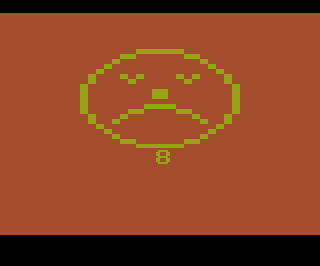
This diagnostic cart performs several hardware checks (RAM, CPU,
TIA, RIOT etc.) and if there are any errors it displays the result
as a frowny face together with a number that defines the error.
This diagnostic cart works on real hardware, but it fails on
emulators which usually display error number 3 (ROM error) or 8
(Collisions). There are actually nine different error
messages that can be displayed:
|
1
|
Switches |
|
2
|
RAM |
|
3
|
ROM |
|
4
|
CPU |
|
5
|
Timers |
|
6
|
Joysticks
|
|
7
|
Paddles |
|
8
|
Collisions |
|
9
|
No Error |
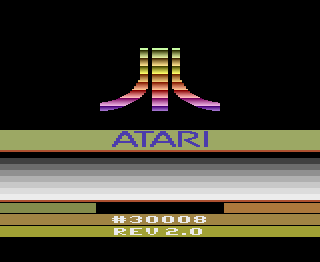
If the diagnostic cart actually passes all
the tests it will display a nice little Atari Fuji logo with the
text '#30008 Rev 2.0' under it periodically. The user
can then test the status of the various 2600 console switches
which will display a 0 or 1 plus a tone when moved.
Version 4.2
This diagnostic cart is very similar to the 5200 version.
It appears to run several video chip tests, which sadly
without the manual are a complete mystery to most people.
There are two screens of bars (color and B&W), and two
other screens which display rectangles at various spots on the
screen. This diagnostic cart appears to require some sort of
special hardware plug to work properly
 
| Version |
Cart Text |
Description |
| 2.0 |
Diagnostic v2.0 |
Version 2.0 |
| 6/1/82 |
4.2 DOM 6/1//82 |
Version 4.2 |
Return
to 2600 Software
|