|
|
Stellar Track
|
Name:
|
Stellar Track |
|
| Company: |
Atari |
|
Model #:
|
CX-2619 |
|
Programmer:
|
Rob Zdybel |
| Year: |
1980 |
|
Released?
|
Yes (Sears version only)
|
|
Notes:
|
Originally
called Stella Trek and S3
|
Stellar Track is a port of the old text
Star Trek game from 1971 by Mike Mayfield. More
specifically it's a port of the Super Star Trek version
that was written by Bob Leedom which was based on Mike's
original code. In the original mainframe version you
play the role of the captain of the Enterprise who must
hunt down end exterminate all the Klingon ships in the
galaxy. When it was decided to port Super Star Trek
to the 2600 some changes had to made due to copyright
issues. Klingons became generic aliens, the
Enterprise became a generic 'Warship', and any hint of
anything remotely Star Trek was expunged. Thankfully
the game doesn't actually need all these Star Trek story
bits and plays exactly the same as generic space game.
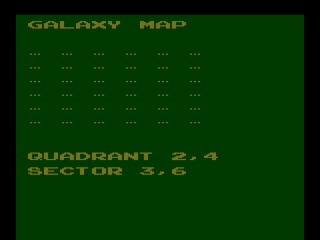
So how does a complex all text space simulation make its
way to a game system that has no dedicated text
display? It all began when programmer Rob Zdybel was
hired into Atari to program for the Atari 8-Bit
computers. Unfortunately there were no openings in
the Home Computer Division at the time so he was sent to
the 2600 division to program games. Since Rob was
given no direction on what type of game to create and he
had a love of old computer games he decided to port Super
Star Trek to the lowly 2600. Of course getting the
2600 to even properly display the game was going to take
some major work. To do this Rob used a interesting
trick called "Venetian Blinds" that allowed the 2600 to
display up to eight sprites per row (instead of the normal
six) by alternating them between two sets of scanlines
(four on one set of scanlines, and four on the
other). This gave Rob the characters he needed to
properly display all the information in the game.
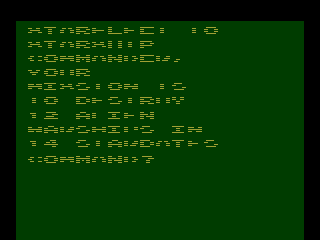
The only side effect of this technique is that the text
isn't made up of solid characters but rather a series of
lines with some minor flicker.
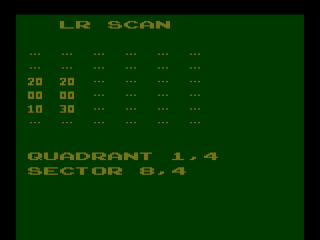
Upon starting the game the player is given a random
number of aliens to destroy and a random number of
Stardates to do it in. If these numbers are not to
the players liking, they can keep resetting the game until
the desired amount of aliens and Stardates appears.
The player can also set the difficulty switches to tweak
the difficulty level of the game. The left switch
controls the Phasor strength of the ship while the right
switch controls the shield strength of the ship.
Once you've accepted your mission you will be asked to
issue a command. In Stellar Track there are seven
different commands, most of which take up one of your
precious turns and some energy (displaying the map and
your status is always free). The commands are as
follows: Galaxy Map, Status, Photon, Phasors, Warp, SR
Scan, and LR Scan. The color of the screen will also
indicate what is currently in your sector (Red=Aliens,
Grey=A Starbase, and Green=Empty).
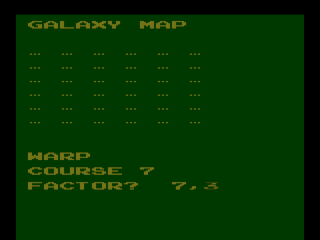
As your goal is to hunt down and destroy all the aliens,
figuring out exactly where they are would be a good first
step. To do this, the player should start with a
Long Range scan to figure out which quadrants of the
galaxy the aliens are hiding in. In Stellar Track
the galaxy is made of up 36 quadrants (reduced from 64 in
the mainframe version) each with 64 sectors each.
The Long Range Scan will show a 6x6 grid that represents
the galaxy. Your Long Range scanners will show
information your current quadrant plus the surrounding
quadrants as a series of two digits. The first digit
represents the number of aliens in that quadrant while the
second digit lets the player know if there's a Starbase
located in the quadrant (0=no, 1=yes). The Long
Range scan also shows your current location by quadrant
and sector.
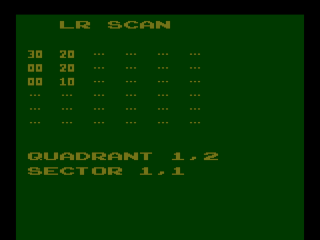
Now that the player knows some of the quadrants that
have aliens in them, it's time to warp to one of them
using the Warp command. When the player selects Warp
the game will ask for a course number from 1 to 8.
The course number represents a direction with 1 being
straight up, 2 being the upper right, 3 being right, 4
being lower right, etc. Once the player picks their
direction they must also choose a warp factor. The
warp factor is made up of two numbers with the first being
how many quadrants the player wants to warp and the second
being how many sectors they wish to warp (for example 4,2
would mean 4 quadrants and 2 sectors). Warping takes
both time and energy so don't go joyriding around the
galaxy (100 energy for each quadrant warped and 10 energy
for each sector). Jumping quadrants will take up a
Stardate for each quadrant but jumping sectors will not
use up any Stardates.
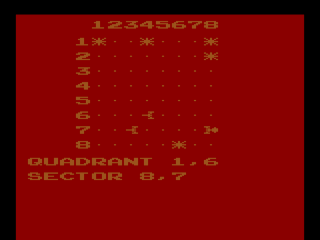
Ok so now the player has warped to a quadrant with
hostile aliens, but we're still not quite ready to engage
yet. First the player must use the Short Range Scan
to pinpoint where in the sector the aliens are. Your
Short Range Scan shows an 8x8 grid of sectors which
represents the current quadrant. The Short Range
Scan will show exactly where any Aliens, Starbases, or
Stars are. The Short Range Scan doesn't use up any
energy or Stardates, but any Aliens in the sector will get
a free shot at you after you use it.
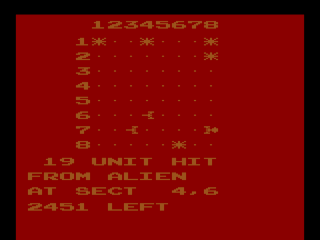
Now that the player has found the Aliens, how do they go
about destroying them? With Phasors and Torpedoes of
course! Your ship comes equipped with both the
latest in Phasor and Photon Torpedo technology.
Phasors will deal damage based on a number of factors
including how close the player is to the target and how
many energy units the player puts into the Phasor blast
(from 000 to 999) which in turn comes out of the ships
energy pool (Aliens have 99 hit points each so plan
accordingly). If there is more than one Alien
present in the sector that is being fired upon the Phasor
energy will be divided up between the Aliens. Photon
Torpedoes on the other hand will instantly destroy an
Alien when hit, but your ship only comes with nine
torpedoes. To replenish the ships torpedo stores the
player must dock with a Starbase (more on that
later). One last thing to remember about Phasors and
Photon Torpedoes is that the player must be directly
within the ships line of sight and cannot be shot through
a star or between quadrants. Phasors do not require
that the ship be directly lined up with the Alien to work.
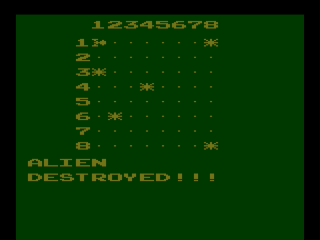
Now would be a good time to bring up Starbases. If
there's a Starbase in your sector you may warp to it and
receive 3,000 energy units and a new compliment of
torpedoes. There are always two Starbases in the
galaxy and they are randomly placed at the start of each
game. Unlike in Star Raiders, Starbases in Stellar
Track are indestructible, although you can still take
damage from enemies when docked. Speaking of damage,
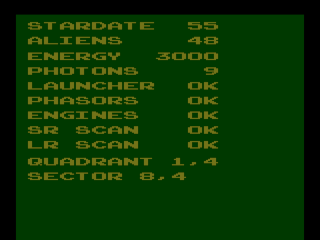
the player can bring up a detailed status report of the
condition of the ship using the Status command. The
status report shows how many Stardates and Aliens are
left, the ships energy stores, how many Photon Torpedoes
are left, and the ships current location. The status
screen also shows the current status of the ships various
functions such as Torpedo Launchers, Phasors, Engines, and
Short and Long Range scans. If any of these systems
are damaged the status screen will show a negative number
(such as -3) which indicates how many Stardates it will
take until the system is repaired. When a
system is damaged that function cannot be used.
Engines are a special case. To fix damaged engines
the player must issue the Warp command for the same number
of quadrants as Stardates needed to repair the damage (the
ship won't actually warp when doing this). So if the
engines had a -2 next to it the player would have to issue
a Warp 2,0 command to fix it. When the engines are
damaged the ship cannot leave the quadrant but can still
move around the current quadrant.
The game ends when either the player runs
out of energy, runs out of Stardates, destroys all the
Aliens or is destroyed by the Aliens. Unlike with
Star Raiders there is no ranking given at the end of the
game. Although Stellar Track was originally planned
to be released by Atari (possibly under than name Stella
Trek), it ultimately given to Sear for their Tele-Games
label as one of three exclusives. This was part of
the deal Sears made with Atari when it agreed to start
distributing their games under it's own label. While
Stellar Track was vastly overshadowed by the flashier
action games of the time, it remains one of the few true
strategy games on the 2600. Stellar Track is a
little slow paced, but worth a try. Think of it as
an all text version of Star Raiders.
| Version |
Cart Text |
Description |
| ?/??/80 |
Stellar T. C012019 |
Final version |
Return
to 2600 Software
|