Donkey Kong Junior
|
Name:
|
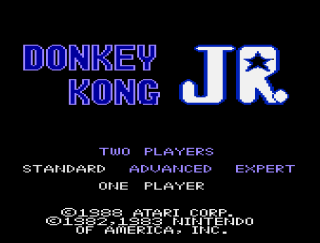
Donkey Kong Junior
|
 |
| Company: |
Atari |
|
Model #:
|
CX-7849 |
|
Programmer:
|
ITDC (International
Technology Development Corporation) |
| Year: |
1988 |
|
Released?
|
Yes
|
|
Notes:
|
Port of the 1982
Nintendo arcade game
|
Following hot on the heels of Nintendo’s runaway smash
hit Donkey Kong, Donkey Kong Junior. turns the tables on Mario
casting him as the villain and Donkey Kong as the ‘damsel in
distress’. Now it is up to Donkey Kong’s son
(appropriately names Donkey Kong Jr.) to rescue his dad and save
him from a life on enslavement in Mario’s circus.
It’s interesting to note that Donkey Kong Jr. is the only game
in which Mario is cast as a villain rather than a hero.
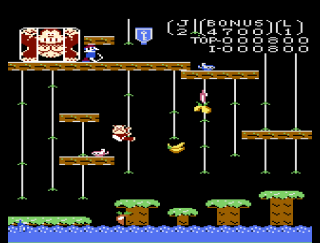
Although some of the mechanics have
changed, the main gameplay of DK Jr. stays close to its
predecessor: jump/avoid obstacles and make it to the top of the
screen. However instead of climbing ladders and jumping
barrels, Junior must climb vines and jump little crocodile
looking enemies called Snapjaws. There are two different
kind of Snapjaws: Red Snapjaws move up and down the vines and
over the platforms and are much more intelligent than the
barrels found in Donkey Kong (they are more like the Fire Foxes
from the first game), while Blue Snapjaws will pick a vine and
move straight down until they plunge off the screen. Each
screen starts with a set number of Red Snapjaws, while Mario
throws out an infinite number of Blue Snapjaws. Thankfully
Snapjaws in the game can be killed by dropping any of the fruit
scattered around the screen on them. Later levels include
new enemies such as birds and even electrical sparks, but they
can all be killed by the almighty fruit.
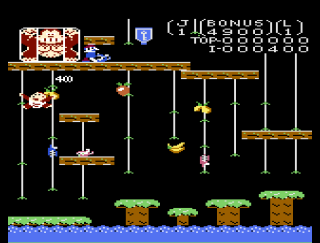
Screen 1: Vines
The vines screen is your standard warm-up screen to get you used
to how all the mechanics in the game work. At the lower
levels this screen isn’t too hard, but at the higher levels it
can actually be quite difficult. On this screen
Junior must climb up and down the vines avoiding Snapjaws in
order to make his way to the top of the screen and grab the
glowing key. Once Junior has made his way past the first
set of vines, he must jump on a few oddly placed platforms
before he can get to the next set of vines. Careful
jumping here is must unless you want to die many a frustrating
death. Also of note is the bunch of bananas in the center
of the screen which can only be knocked off from the adjacent
vine since they are actually below the vine they appear to be on
(don’t fall for it!).
Once Junior makes it to the top, Mario will cart off
Donkey Kong and you’ll be left looking like an idiot.
Let’s quickly move onto…
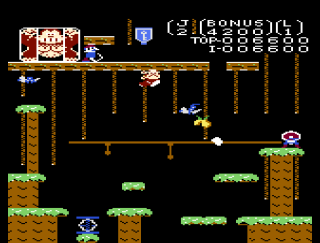
Screen 2: Spring Board
IMHO the spring board is the toughest screen in the game.
Not only is the entire bottom section of the level full of
moving platforms and dodgy jumping, but the top section has tiny
vines and insanely fast birds. At the start of this level
you’ll notice a spring board that Junior must jump on.
Normally Junior will automatically jump over to the next
platform, but if you time it right and push the jump button
while at the board is at the bottom you can catapult yourself up
to the higher platform. This shortcut is kind of tricky,
but once you get used to it it can be a valuable time saving
tool. Either way, Junior must jump from platform to
platform (did I mention they were moving?) and grab onto the
vines that are slowing moving along the track. Did I
mention that these vines are also moving up and down like the
ladders at the top of the Pie Factory stage in Donkey
Kong? As if you didn’t have enough problems, the whole
time you are attempting to do this, the birds from the top of
the screen will try and drop eggs on you.
Once at the top of the screen you must make your way
along a series of short vines while dodging the original ‘angry
birds’ which are actually called Nitpickers. The
problem with this section is that Junior has very little room to
maneuver and the birds move very fast and appear to randomly
pick which level they fly at (there may be a pattern, but it’s
not obvious). So once Junior makes it to the gap where
they fly down from, it’s more a matter of luck rather than
skill. Assuming you’re able to pass the gap you’re pretty
much home free, simply jump up to the top and grab that
key. Onward to…
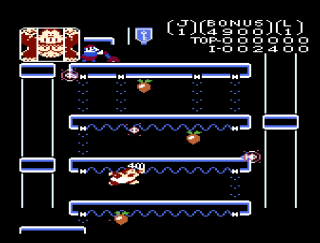
Screen 3: Hideout
The hideout is Donkey Kong Junior’s ‘Pie Factory screen’.
Most players never get to see it until they get good at the game
so they don’t know it even exists and are surprised the first
time it appears. The hideout also happens to be one of the
most interesting and fun screens in the game. Not only is
it graphically (and thematically) different from the rest of the
game, but it’s also not too hard. The hideout
introduces a new enemy called the Spark. Much like the
Snapjaws, there are two different kind of Sparks: Yellow Sparks
and Blue Sparks. Yellow Sparks are similar to Red
Snapjaws, but they can only go around the platform they start on
(they cannot move up and down the circuit pathways), while Blue
Sparks behave like Blue Snapjaws and will move down the circuit
pathways from the top of the screen.
On this screen Junior must run across each level jumping
over Sparks and ascending the vines(?) on the side of the
screen. The only tricky part of this level is on the last
level where Junior must run under four circuit pathways as the
Blue Sparks will randomly travel down one of these pathways
(it’s a crapshoot as to which one they choose). It’s easy
for Junior to get nailed by the Blue Spark here, so wait for the
Spark to go and then run as fast as you can to the other
side. Once you reach the key at the top you’ll be whisked
away to the final screen. Incidentally, the reason this
screen is referred to as The Hideout is that in the arcade
version there’s a short cutscene (sadly cut from this version)
showing Mario fleeing with Donkey Kong to his hideout in a
helicopter which Junior following on an umbrella (seriously!).
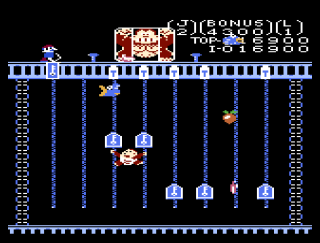
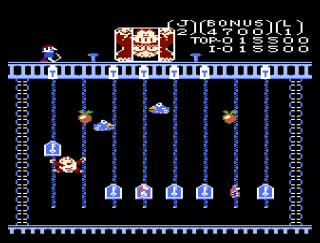
Screen 4: Chains
The chain screen is one of the most fun in the game. Here
Junior must get underneath and push up the glowing keys into the
locks at the top of the screen. There are six keys in
total, but if you’re good you can do the center keys two at a
time to speed things up (just be careful to watch for
Snapjaws!). On this screen Junior must contend with both
Red and Blue Snapjaws as well as those pesky Nitpickers from the
spring board level. After unlocking all six locks, Donkey
Kong will be freed and Mario will get the boot (well not in the
7800 version sadly). Unfortunately your joy is short lived
as Donkey Kong gets captured again (and again, and again, and
again).
The Atari 7800 port of Donkey Kong Junior is
actually pretty good all things considered. All four
levels are here and the music, while still terrible, is far
better than it was in the 7800 port of Donkey Kong.
Overall you get a decent representation of the DK Jr. arcade
experience, as long as you keep the volume down that is.
This port (along with Donkey Kong and Mario Bros.) was
programmed by a small company called ITDC which may have
outsourced their titles to a subsidiary in Shanghai China called
the Shanghai Software Consortium (SSC).
This means that this port was most likely done overseas by
programmers with little to no experience with the 7800 and
without much in the way of tech support. Given this, it's
amazing that the game turned out as well as it did.
| Version |
Cart Text |
Description |
| 6/8/88 |
|
Late level WIP |
Return
to 7800 Software
|